ASIC Overclocking vs. Underclocking
Overclocking or underclocking your miner can improve your mining strategy. Every mining machine runs firmware that manages various aspects of the hardware. Hashing algorithms, power consumption, temperature, clock speeds and pool connectivity all depend on the firmware installed on the miner. The type of firmware defines the hardware’s end use.
Still finding the world of crypto and mining a little blurry? See how we got here in our article on the history of money, from barter to Bitcoin. And if you are wondering whether it is better to mine other proof-of-work coins than Bitcoin, this guide is for you.
In this article, we dig into the following topics:
- Factory settings vs. custom firmware
- Overclocking, underclocking and autotuning
- The cost of custom firmware
- Strategy simulations
Default software, or factory firmware
Every piece of mining hardware ships with default software, generally installed during manufacturing. It includes the basic settings and the features essential to running the hardware, but it lacks customization and configuration. Factory software lets the manufacturer certify the hardware’s operating conditions and its warranty.
Custom firmware to overclock or underclock your miner
Third-party developers offer to replace the factory firmware to give you more control over the hardware. Their software lets a miner modify and customize the firmware to suit their needs — making it possible to overclock, underclock or even autotune the miner.
What is overclocking?
Overclocking means increasing the clock frequency, and therefore the processor’s performance (its hashing capacity per second = hashrate). This performance boost requires more power, which means more heat and higher operating temperatures. Without better temperature management, the miner’s efficiency (the consumption/hashrate ratio) drops, as does its lifespan.
Pros:
- Increases power (hashrate/s)
- Lowers the cost of acquiring power (price per hashrate)
- Increases gross output
Cons:
- Increases consumption
- Increases temperature
- Reduces lifespan
- Can reduce efficiency
Note: beyond a 5–10% increase in frequency, with standard fan cooling, there is a risk — components of the miner can burn out (memory sticks, voltage regulators, the ASIC itself, etc.).
What is underclocking?
Unlike overclocking, underclocking aims to lower the miner’s clock frequency, and therefore the processor’s voltage. With fewer calculations per second, the hashrate drops while consumption and lifespan are optimized.
Reducing power draw and heat output is advantageous when electricity costs are high or when effective hardware cooling is not possible.
Pros:
- Lowers consumption
- Improves efficiency
- Reduces operating temperature
- Increases lifespan
Cons:
- Increases the cost of acquiring power (price per hashrate)
- Reduces power
- Decreases gross output
Note: an ASIC’s operating temperature increases its consumption independently of its power. Cooling management becomes a pillar of the activity.
Underclock or overclock? The middle ground with autotuning

Autotuning automates the tuning of the miner’s parameters based on its operating environment. From the miner’s analysis (temperature, etc.), the system adjusts in real time various parameters such as clock frequencies and fan speeds. Autotuning also analyzes each ASIC chip in the miner to determine the optimal voltage for each one. With this analysis (around two hours), we can determine the maximum power the miner can use while avoiding any energy waste.
Pro:
- An optimal balance between efficiency and performance, based on the miner’s environment
Con:
- Requires more maintenance and attention
The cost of custom firmware
Using custom firmware generally comes with a cost. Firmware developers usually charge fees — as one-off payments, recurring subscriptions, or a percentage of the miner’s output. Sometimes a mining pool and a firmware developer collaborate to offer discounts.
Overclock or underclock? Simulation of an S19J Pro in immersion
As mentioned earlier, without a cooling process to supplement the fans, heavy overclocking is risky. But different cooling methods exist — discover them in our article on comparing ASIC cooling methods.
In our example, we assume immersion cooling (the miner submerged in a dedicated liquid). With this mechanism, the increase in consumption matches the increase in power, not heat. For underclocking, we use fans as the cooling source under normal conditions (above 40°C).
The results of an overclocking or underclocking strategy
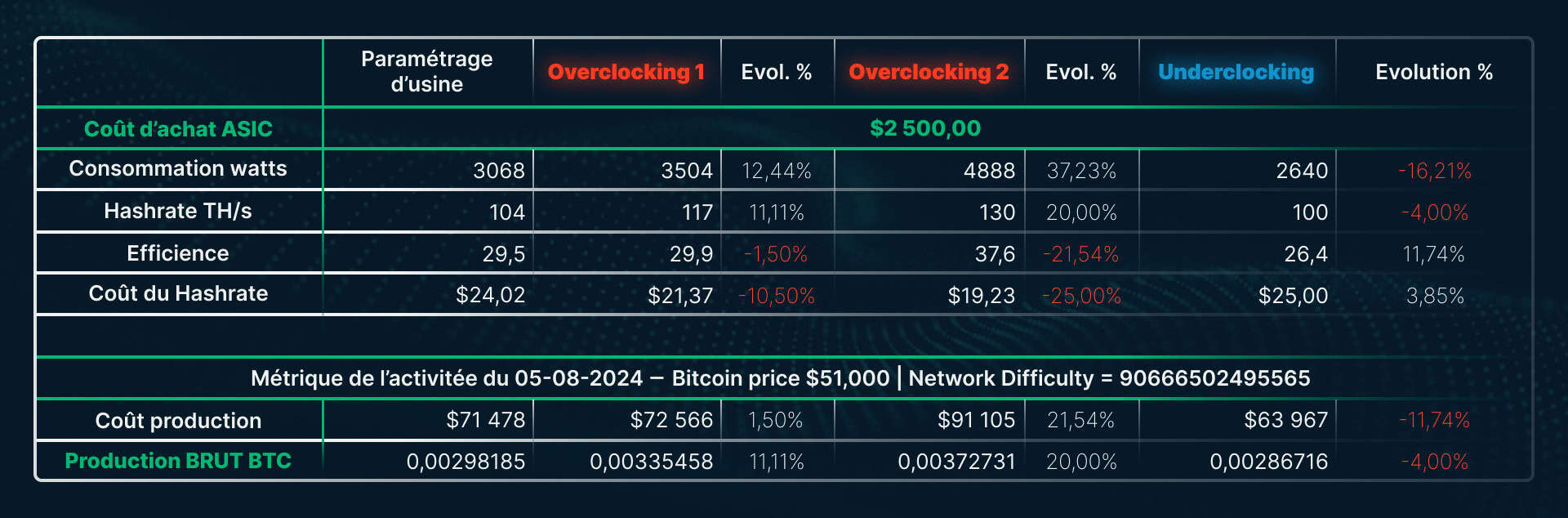
This table shows the consequences of overclocking and underclocking on mining metrics. Each strategy affects gross output and the production cost in Bitcoin.
The overclocking 1 and 2 data prove there is no point pushing overclocking to its maximum: the efficiency loss grows larger the more aggressive the overclock.
Overclocking 2 increases the miner’s consumption by almost double the power gain, which reduces its efficiency. The production cost rises from $71k (factory settings) to $91k.
By contrast, overclocking 1 increases gross output by 11.11% for a production cost only 1.5% higher. Here, the rise in consumption is almost equal to the rise in power.
Underclocking has positive effects: it cuts consumption by 16% for a power loss of only 4%. Efficiency improves by more than 11%, bringing the cost of producing one Bitcoin down to $64,000.
This table shows that a custom-firmware strategy can make the difference between a profitable and an unprofitable miner. On that note, is it better to start your mining journey with a new or a used ASIC? Find the answer in our guide on new vs. used Bitcoin ASIC miners.
The choice between factory and custom firmware depends on each miner
Modifying crypto-mining equipment depends on specific goals and on the cost of energy. Factory firmware offers manufacturer-guaranteed stability but lacks flexibility and customization. Custom firmware, by contrast, allows greater control over performance and can significantly influence the profitability of the activity.
It is crucial to note that overclocking, while potentially lucrative by increasing hashrate, carries risks if cooling is not managed properly. Underclocking favors greater energy efficiency and a longer lifespan, though it reduces gross output. Autotuning is an intermediate solution, balancing performance and efficiency, but it requires constant monitoring and more complex management.
Conclusion
In conclusion, you must carefully weigh the costs of custom firmware to make sure they do not undermine the profitability gained from the operation.
Ultimately, every miner must assess their own needs and resources to choose the best firmware strategy. Smart firmware management can maximize profits while ensuring the durability and efficiency of the mining hardware.
Want to overclock or underclock your miner? Startmining brings you this depth of experience from the moment your miner/ASIC is installed in one of our mining farms.
Buy or mine Bitcoin? Find the answer in our article on buying vs. mining Bitcoin.
Passez à l'action
Ready to mine Bitcoin with Startmining?
Browse our ASIC shop or simulate your profitability in real time.